Migrations and retirements
When your design system replaces or removes a component, record it once on the governance page and the dashboard follows it across every repo. For example, record that LegacyButton from @acme/ui-legacy is superseded by Button from @acme/ui. Every use of LegacyButton is then marked deprecated, and a chart shows repos moving to Button scan by scan.
What you add is a lifecycle record. A superseded record tracks a migration; a retired one tracks a retirement, for a component that goes with no replacement.
Record a migration
-
Select governance in the top navigation and press Add record. With no records yet, the form is already open.
-
Open Source and type a few words, such as
legacy button. Every word must match the package name or the component name. -
Pick what the record covers:
- the
LegacyButtonrow under@acme/ui-legacy, for that component, or - the whole package row for
@acme/ui-legacy, for every component in it.
The hint under the field confirms which one you picked.
- the
-
Leave Disposition on Superseded.
-
Open Superseded by and pick the
Buttonrow under@acme/ui. If you pick the package row instead, the whole of@acme/uicounts as the replacement. -
Press Create.
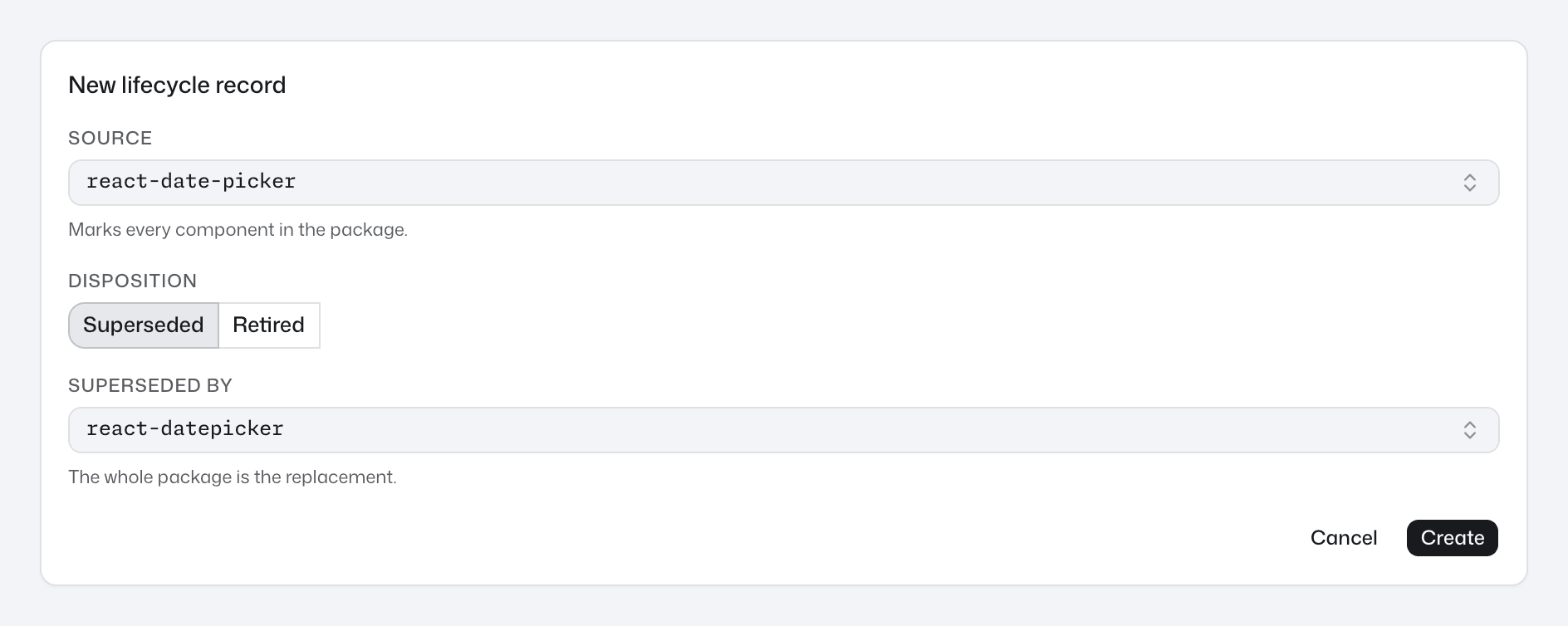
The pickers only offer packages and components that appear in uploaded scans. If LegacyButton is missing, upload a scan of a repo that uses it first. Components defined in the repo are never offered.
A web component such as <acme-button> is offered under a package only when a scan links the tag to that package, and a record covers it only in the scans that make that link. Link web components to your package shows how.
Each package or component can have one record, and a package has either one whole-package record or records on single components, not both. If saving is refused, a message in the form says why, and for an existing record usually offers Go to the existing record so you can edit that one instead.
Record a retirement
Retire a component when it is being removed with no replacement, for example Modal from @acme/ui-legacy.
- On the governance page, press Add record.
- In Source, pick the
Modalrow under@acme/ui-legacy, or the package's whole package row. - Set Disposition to Retired.
- In Reason, say why it is going, for example
Removed in @acme/ui-legacy 4.0; no replacement. - Press Create.
What changes, and when
As soon as you save, every component the record covers shows as deprecated in every repo: warning icons, deprecated chips and the Deprecated columns. That includes scans already uploaded, so no rescan is needed. A record on Card covers it from every import path, such as @acme/ui and @acme/ui/card, and its parts, such as Card.Header.
The record's status and progress follow a moment later, once the dashboard has recalculated. If a new record has no status yet, reload the page. Each record then shows one of these:
- active in N repos: N repos' latest scans still use the deprecated component (just active when only one repo has been scanned).
- complete: it has been used before, and no repo's latest scan uses it now.
- never matched a scan: see Never matched a scan.
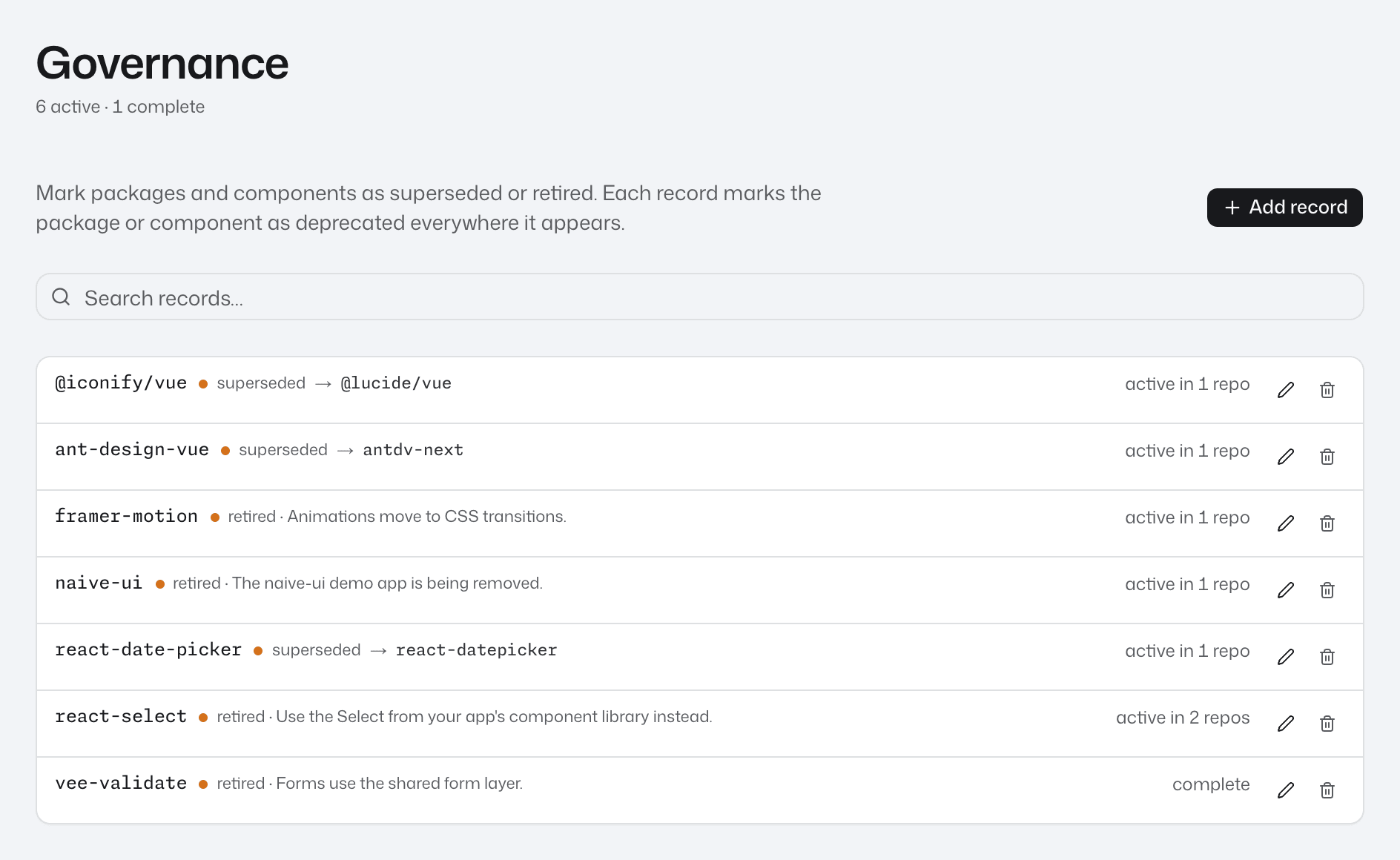
Follow progress
On the governance page, select a record's status to open its chart: occurrences over time of LegacyButton and Button, added up across every repo. Each side counts its component from every import path, together with its parts. If no scan the chart covers has Button yet, the successor side counts all of @acme/ui instead and is labelled with the package name. A retirement's chart shows the retired component alone.
The same charts are on the charts page. Each migration has a row under Migrations reading N% migrated, and each retirement a row under Retirements reading N remaining, the occurrences still in use. See Charts.
To follow one repo, open it from repos and go to its Adoption tab. Migrations in this repo and Retirements in this repo count that repo alone, so their numbers can differ from the charts page. A repo that never used LegacyButton has no row for it. See Follow adoption in a repo.
How a migration's progress is counted explains the percentage.
When a record reads complete
No button marks a record complete. It reads complete once no repo's latest scan uses LegacyButton, so finishing a migration means:
- Remove the last uses of
LegacyButtonfrom each repo. To find them, openLegacyButtonfrom its package page and see Find where a component is used. - Scan each of those repos and upload the scan. Every repo counts with its latest scan, however old, so a repo not scanned since it last used
LegacyButtonkeeps the record active. Run in CI keeps scans coming.
On the charts page, complete records move behind Show N complete. If a later scan uses LegacyButton again, the record goes back to active. Keep the record once it is complete: it still marks any new use as deprecated.
Never matched a scan
A record reads never matched a scan, and has no chart, when none of the scans in the dashboard contain the package or component it names. The pickers only offer what scans contain, so this happens when the scans that used it have since been removed from the dashboard. Upload a scan of a repo that still uses it and the status comes back, with no edit needed. If no repo uses it any more, the status stays, and the record still marks any new use as deprecated.
Edit or delete a record
To change a record, press the pencil button on its row, change the form and press Save changes.
To delete a record, press the bin button on its row, then Confirm.
Deleting a record removes its deprecated mark straight away, so a new use of LegacyButton shows as an ordinary component. Its chart and its rows on the charts page and on each repo's Adoption tab go too, once the dashboard has recalculated.
Next step
To compare whole libraries rather than one component, such as @acme/ui against @acme/ui-legacy, tag your libraries and chart them. See Charts.